ZyFlow
AV System Diagrams
& Instant Quotes.
Drag products onto the canvas, draw signal connections SDI-style, and export beautiful diagrams with a full Bill of Materials and pricing — as PNG or PDF.
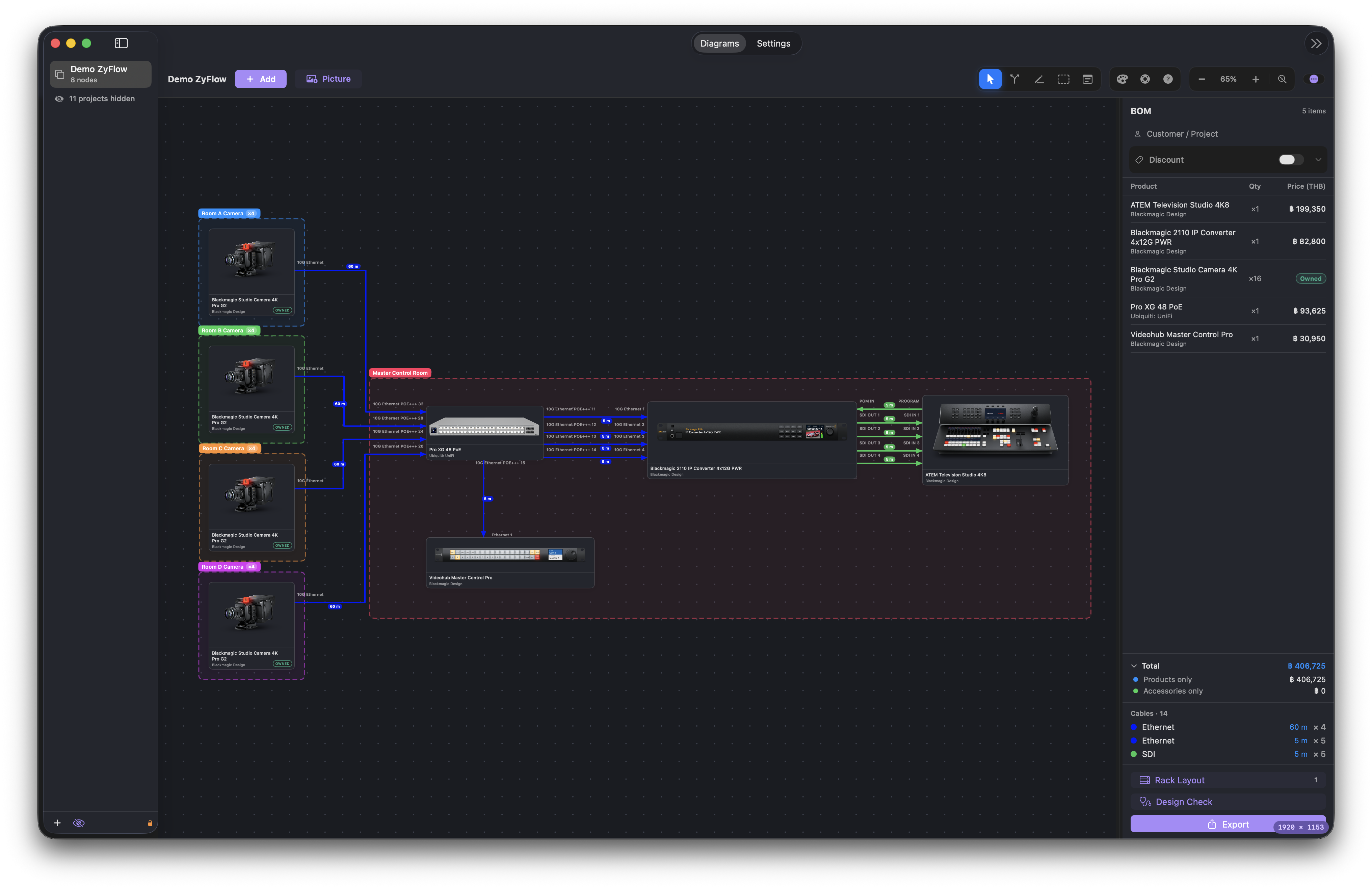
Drag products onto the canvas, draw signal connections SDI-style, and export beautiful diagrams with a full Bill of Materials and pricing — as PNG or PDF.
Built for AV & broadcast system integrators — from rough layout to client-ready proposal.
Place any product on the canvas from a searchable catalog with real product photos and multiple angles.
Connect devices SDI-style — straight, curved or routed lines with arrowheads that follow your cards.
Real connector data per product. Pick the right port, and get warned about mismatched type, direction or reused ports.
Assign a colour per cable type (SDI, HDMI, Fiber, Power…) once — every line updates instantly.
Live BOM with quantities, list price, discounts and grand total — your quote builds itself as you design.
Auto-count every cable by type, including AC vs DC power — so you know exactly what to order.
Preview, position and crop your page before exporting a clean diagram plus BOM and cable list.
Pull the latest prices, images and ports from the product database — your quotes always use up-to-date pricing.
Add a customer/project name and apply discounts — present a polished proposal in seconds.
Plan what goes in which rack unit, dragging gear into place. The palette is your own parts list, counting down as you fill the racks — so the elevation can never disagree with the quote.
Print rack elevations as plain boxes, or as the real thing — dark rails, mounting holes and each device wearing its own front panel. Your client recognises their own kit.
Reads the finished drawing the way a careful colleague would: outputs wired to outputs, a socket with two cables on it, a device with no power drawn, a cable with no length to order, a discontinued product still being quoted.
Power leads run to a wall socket, not to a box worth drawing. Record them without a line on the canvas — they still reach the parts list, the cable schedule and the length you have to order.
One row per physical cable with both ends spelled out, port to port, with its length — the sheet the installer actually works from.
Gear that isn't in the database — the client's existing monitor, a rented camera — goes straight on the diagram as a picture. Name its ports as you wire it up.
Rest on a cable and the rest fade back so you can follow it end to end. On paper, crossings are drawn as little bridges — so a crossing never reads as a junction.
Upload your company logo once and every exported diagram and parts list goes out under your own brand.
Monthly subscription
7-day free trial in the app · Cancel anytime
Start free trialZyFlow is a macOS app for designing Blackmagic Design systems. You drag and drop from 310+ Blackmagic products (ATEM, HyperDeck, URSA, DeckLink), connect their real ports with automatic validation, and export professional PDF quotes with a Bill of Materials and cable list. It is built for AV and broadcast system integrators.
Yes. ZyFlow includes every ATEM model with accurate port data (SDI, HDMI, Fiber, 2110 IP, and more), plus HyperDeck, URSA cameras, DeckLink, Ultimatte, converters and accessories — over 310 Blackmagic Design products in total.
ZyFlow is $4 per month with a 7-day free trial. No credit card is required to start the trial and you can cancel anytime.
Yes. With one click ZyFlow exports a professional PDF containing the system diagram, a full Bill of Materials with pricing, and a cable list showing each cable type, length and quantity.
ZyFlow runs on macOS 14 (Sonoma) or later, on both Apple Silicon and Intel Macs.
Add up the height of each device in rack units, then allow for the ones that are not full width. Several Blackmagic boxes are one rack unit tall but only two thirds of the width — the ATEM 1 M/E Constellation and the ATEM Television Studio among them — and a third-width box such as a HyperDeck Studio HD Mini is narrower still. Two of those can share a single U side by side, but only if they are sitting on a rack shelf, which is a separate item you have to buy. Converters, power supplies and anything that is not rack-mountable at all need a shelf or a tray as well. ZyFlow keeps the height and width of each product, lays the rack out unit by unit, and warns you when something is sitting in a unit with no shelf under it.
Most AV system drawings are made in a general diagram tool — Visio, Lucidchart, OmniGraffle or Illustrator — and the quote is then typed separately into a spreadsheet. That split is where the errors come from: the drawing changes, the spreadsheet does not, and the quote goes out short of a converter or a cable. A purpose-built tool keeps one source for both, so adding a camera to the drawing adds it to the bill of materials and adds its cables to the cable schedule at the same time. ZyFlow does this for Blackmagic Design systems on macOS, exporting the diagram, the bill of materials, the cable schedule and the rack elevation as a single PDF.
One connection is one cable, but a few things are easy to miss. A lead that is moulded onto the device — the USB-C tail on a USB-to-Ethernet adapter, for instance — is not a cable you buy, and neither is a power lead that ships in the box with the device. Runs that leave the room to a wall socket or a patch panel still have to be counted even though they do not appear between two boxes on the drawing. Cables of the same type but different lengths should be listed separately, because a 50 m SDI and a 1 m SDI are two different things to order at two different prices. ZyFlow counts each connection as it is drawn, groups them by type and length, lets you mark the leads that come attached, and prints the result as a cable schedule the installer can tick off on site.
The expensive mistakes are quiet ones. An output wired to another output, or an SDI run into an HDMI socket, will not work on site but looks fine on a drawing. A socket with two cables on it is a port you have sold twice. A device drawn with no power connection is one nobody has quoted a lead for. A cable with no length is a cable nobody can order. A product with no price in your database adds zero to the total, so the quote goes out short by whatever that box is worth. ZyFlow's Design Check reads the finished drawing for all of these before the PDF is exported, and lets you sign off anything that is deliberate with a written reason.